OPERATOR REFERENCE GUIDE
Installation and User Guide
A plain-language guide to installation, jumper settings, game rules, diagnostics, and service tests
|
The one rule to remember No decimal point means a score. A decimal point means the machine is talking to you. |
|---|
Bally Home Replacement Controller | Firmware 2.30
Contents
- Installation
- Game setup jumpers
- Standard game rules
- Enhanced (advanced) game rules
- Display messages and power-on checks
- Troubleshooting
- Service tests
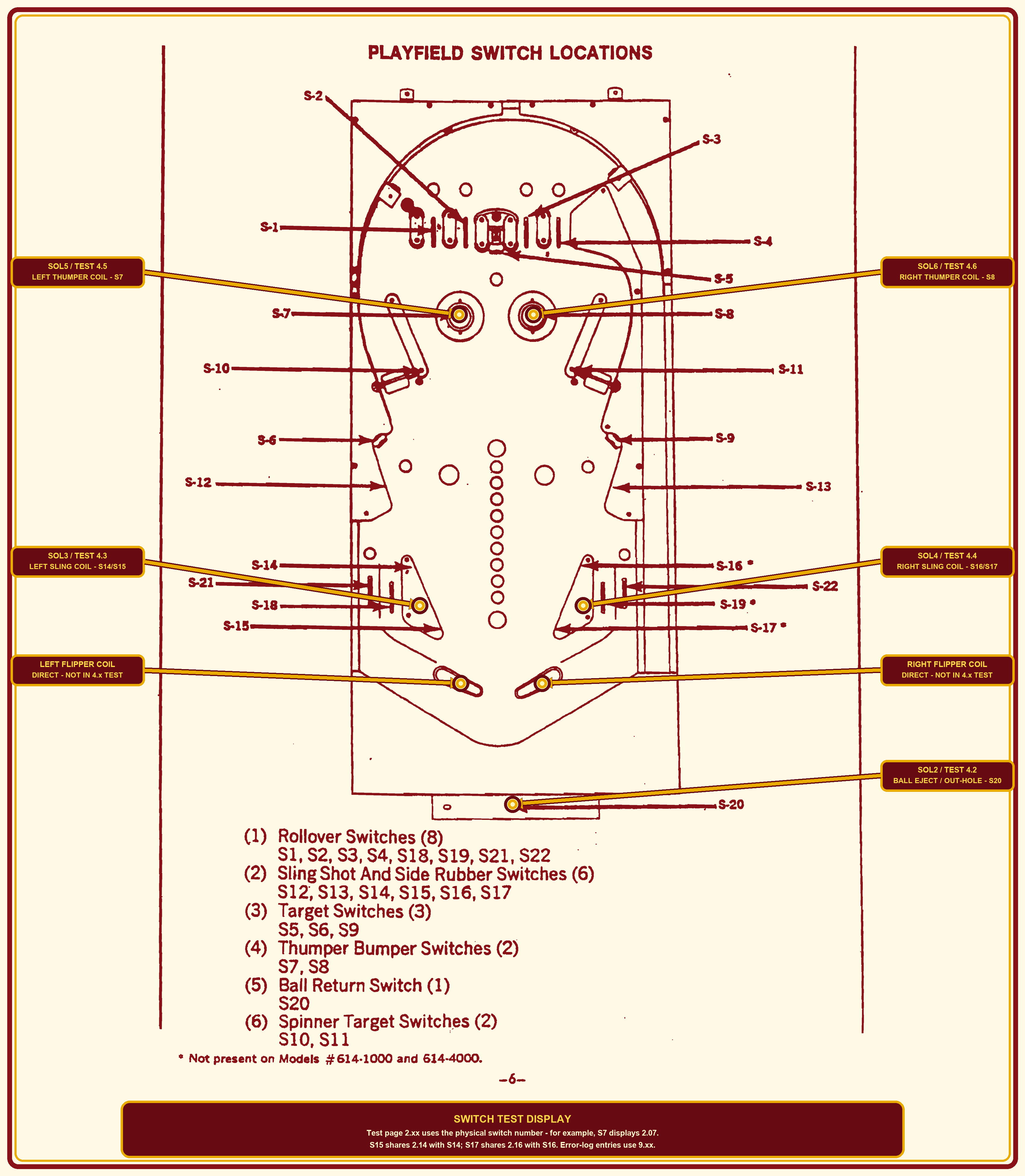
- Playfield switch and coil reference
Installation
Follow this procedure to replace the original power-supply and controller boards with the Bally Home replacement system.
Safety and compatibility
WARNING: Switch the pinball machine off and unplug it from the wall outlet before opening the cabinet or disconnecting any wiring. Never perform installation work while the machine is energized.
IMPORTANT: The original power-supply board is not compatible with the replacement system and MUST be removed. Do not attempt to operate the replacement controller with the original power-supply board installed.
Board installation
- Confirm that the machine is switched off and unplugged from the wall outlet.
- Locate the original power-supply board on the lower rear wall inside the pinball cabinet.
- Disconnect the two original wiring-harness connectors from the power-supply board, then remove the original board from the cabinet.
- Install and securely fasten the new jumper board in place of the original power-supply board. Connect the two original wiring-harness connectors to the matching connectors on the jumper board.IMPORTANT - SYSTEM 1 TRANSFORMER CONNECTOR J2 (CONN A): Some machines use a 9-pin transformer connector instead of a 10-pin connector. With a 9-pin connector, mate the yellow-wire terminal with the bottom board pin; the top board pin will remain without a mating socket. The connector's plastic keyway plug must align with J2's missing pin at position 4. When the yellow wire is at the bottom and the keyway lines up, the connector is correctly positioned. Do not force the connector.
- Remove the original controller board and securely install the replacement controller. Connect the original wiring as shown in the applicable System 1 or System 2 connection diagram.
- Verify that both replacement boards are secure, every connector is fully seated, and all wiring is safely routed before closing the cabinet.
Initial power-up
- Plug the pinball machine into the wall outlet and switch it on.
- Observe the startup display and confirm that the controller completes its power-on checks.
- If a 9.xx message appears, use the Power-on error chart and troubleshooting instructions in this guide to identify and correct the reported switch fault.
Game setup jumpers
JP1, JP2, and JP3 are three-pin selectors with identical functions on System 1 and System 2. Pin 1 has a board marking. The controller reads these settings only at power-up.
WARNING: Switch the machine off and unplug it before moving any jumper. Never move a shunt while the controller is powered.
How to change a setting
1. Switch the machine off and unplug it from the wall outlet.
2. Locate JP1, JP2, or JP3 on the replacement controller and identify the pin-1 end from the board marking.
3. Pull the removable shunt straight off the two pins. Do not twist or bend the header pins.
4. Install the shunt over pins 1-2 or pins 2-3 as listed below. The center pin, pin 2, must always be covered.
5. Recheck the shunt, reconnect wall power, and switch on to apply the setting. Always cover two pins.
|
Jumper |
Shunt position |
Selected setting |
What the setting does |
|---|---|---|---|
|
JP1 |
Pins 1-2 |
Enhanced rules |
Enables enhanced speech, the first-pass top-lane award, ball save, and the repeating timed standup-target feature. |
|
JP1 |
Pins 2-3 |
Standard rules |
Uses the standard scoring, bonus, extra-ball, player, and ball sequence without enhanced speech or timed features. |
|
JP2 |
Pins 1-2 |
100,000-point step |
Awards score-based extra balls at 100,000, 200,000, and 300,000 points for each player. |
|
JP2 |
Pins 2-3 |
50,000-point step |
Awards score-based extra balls at 50,000, 100,000, and 150,000 points for each player. |
|
JP3 |
Pins 1-2 |
TEST |
Starts the ten-page service-test sequence at power-up. |
|
JP3 |
Pins 2-3 |
NORMAL |
Starts normal attract and gameplay operation after the power-on switch check. |
When settings take effect
- JP1 selects Standard or Enhanced rules at power-up. That choice applies to every game until the machine is restarted.
- JP2 selects the score-based extra-ball threshold at power-up. That choice remains active until the machine is restarted.
- JP3 selects NORMAL or TEST at power-up. To enter or leave service mode, switch off, change JP3, and restart. Settings cannot change during operation.
Standard game rules
With power off, set JP1 to pins 2-3, then power on for Standard play. These rules also provide the foundation for Enhanced play, which adds the features described in the next section.
Starting a game and adding players
- The first START press immediately turns off GAME OVER, starts Player 1 on Ball 1, resets all player scores, and ejects the ball.
- Press and release START again to add Player 2, Player 3, and Player 4. A maximum of four players may be registered.
- Players may be added only until Player 1 on Ball 1 first scores or that ball drains. After scoring begins, additional START presses do not add players.
- After each player is added, every selected player lamp is lit for up to one second. The display then returns to exactly one player lamp. Scoring ends this player-count display immediately.
Reliable ball delivery
If the ball lifts out of the drain trough and falls straight back before the launch is confirmed, the controller tries again without using another ball or changing players. It allows up to five attempts, then stops and displays 10.20 if the ball still cannot be delivered.
Player and ball order
- Each selected player completes the current ball before the ball number advances. For example: Player 1/Ball 1, Player 2/Ball 1, then Player 1/Ball 2.
- Each player receives five numbered balls, plus any earned extra balls. An extra ball keeps the same player and ball number for the replacement shot.
- Outside the player-registration display, exactly one player lamp and one ball lamp remain lit.
Playfield scoring
These base awards and bonus requirements apply in both Standard and Enhanced play. Enhanced awards are added to the normal points and stored bonus.
|
Switch or feature |
Standard scoring and action |
|---|---|
|
S1-S4 - top letter lanes |
Every closure scores 1,000 points and adds 1,000 stored bonus, whether its letter lamp is on or off. A lit matching letter turns off on its first hit. When all four letters are off, award 25,000 points and relight all four so the bank may be completed again without limit during the ball. |
|
S5, S6, S9 - number targets |
Every hit scores 500 and stores 1,000 bonus. It alternates the lit extra-ball lane (L21/L22). A first hit turns off its number lamp and qualifies Double Bonus. Collect all three numbers and a full four-letter bank for Triple Bonus. |
|
S7 - left thumper bumper |
Scores 100 points and pulses the left thumper coil. |
|
S8 - right thumper bumper |
Scores 100 points and pulses the right thumper coil. |
|
S10 and S11 - spinners |
Score 100 points for each accepted closure. Fast spinner contacts use the short spinner debounce so rapid turns are captured; a held contact cannot score repeatedly. |
|
S12 and S13 - side-rubber switches |
Each hit scores 50 points and adds 1,000 stored bonus. |
|
S14/S15 - left lower slingshot |
Scores 100 points and pulses its coil. The lower slingshots share a 500 ms scoring-and-coil lockout to suppress rubber and playfield bounce. |
|
S16/S17 - right lower slingshot |
Scores 100 points and pulses its coil. It shares the same 500 ms lockout with the left lower slingshot. |
|
S18 and S19 - lower inside rollovers |
Each closure scores 500 points and adds 1,000 stored bonus. |
|
S21 and S22 - lower outside lanes |
Each closure always scores 500 points. If that lane's L21 or L22 Extra Ball When Lit lamp is on, it also awards an extra ball. These lane switches never alternate the lit side. |
|
S20 - ball trough/drain |
After the launched ball has left the trough, the next valid closure ends the ball, counts the stored bonus, and advances to the next player or ball unless an extra ball or enhanced ball save applies. |
|
TILT |
Turns off the controlled coils, cancels the current player's stored bonus and multiplier, and forfeits the current ball when it returns to the trough. |
Bonus and multiplier rules
- Stored bonus grows in 1,000-point steps beyond 19,000. The bonus lights show your progress, with upper lights marking completed 10,000-point blocks. Bonus keeps accumulating after all markers are in use.
- The four top letter lanes and three numbered targets begin lit on each new ball. Collect each top lane to turn off its matching letter light. Completing all four letters scores 25,000 points and resets the bank so you can complete it again. Lanes and targets still score when their lights are out.
- Double Bonus: Hit any numbered target that has not yet been collected on this ball to light Double Bonus.
- Triple Bonus: Collect all three numbered targets and a full four-letter bank. Letter banks reset when completed, so letters reset before the last numbered target must be collected again. A skill-shot hit counts as its normal letter hit.
- When the ball ends, your stored bonus is added in 1,000-point steps. Double Bonus counts the full bonus twice; Triple Bonus counts it three times. Standard mode counts each 1,000-point step at 250 ms; Enhanced mode uses 208 ms.
Extra-ball rules
- JP2 selects three score-based extra-ball awards per player: either 50,000/100,000/150,000 or 100,000/200,000/300,000.
- S5, S6, and S9 are the only switches that alternate which outside lane is lit for Extra Ball When Lit.
- S21 and S22 always score 500 points; entering the currently lit lane also banks an extra ball.
- L20, Same Player Shoots Again, lights while the current player has a banked extra ball. In Enhanced mode, the ball-save timer temporarily flashes this lamp.
End of game
After the last selected player's fifth ball and any earned extra balls are complete, GAME OVER lights and the four-place high-score leaderboard begins cycling.
Four-place high-score leaderboard
- At the end of a game, the controller compares each participating player's final score with the saved leaderboard and keeps the four highest scores in descending order. A player's increasing score during the game does not occupy more than one position.
- During GAME OVER, each populated rank is displayed for two seconds. The matching PLAYER lamp flashes rapidly: PLAYER 1 identifies first place, PLAYER 2 identifies second place, PLAYER 3 identifies third place, and PLAYER 4 identifies fourth place.
- The flashing PLAYER lamp identifies the leaderboard rank, not the player number from the game in which the score was earned.
- All four scores remain saved when the machine is switched off. To erase the complete leaderboard, use Test 9 as described in the Service-test chart.
- The leaderboard stores score values only. It does not store player names, initials, or the original player number.
Enhanced (advanced) game rules
With power off, set JP1 to pins 1-2, then power on for Enhanced play. All Standard scoring, stored bonus, multipliers, extra-ball rules, and player order remain active. Enhanced mode adds spoken prompts, a first-pass top-lane award on each serve, a one-use ball save, repeating standup-target challenges, and a faster bonus count.
Musical cues and enhanced speech
Musical cues mark game events, and Enhanced mode adds spoken prompts such as "Let's Play," "Double Bonus," and "Extra Ball." Both flashing-light challenges use "Shoot the flashing light" to announce an opportunity and "Big score" when you collect the extra 10,000 points. Routine scoring tones do not interrupt an active spoken instruction.
|
Sound cue |
When it plays |
|---|---|
|
Beethoven's Fifth - public-domain composition |
The first START press begins a new game. |
|
Original top-lane chime |
Accepted S1-S4 top rollover closures. A successful Enhanced flashing-lane award uses "Big score" instead. |
|
Original double-bonus rise |
The first hit on any uncollected numbered target qualifies Double Bonus. |
|
Original triple-bonus fanfare |
All three numbered targets and a complete four-letter bank qualify Triple Bonus. |
|
Original extra-ball celebration |
The current player earns an extra ball. |
|
Original tilt warning |
The current ball is tilted. |
|
Original game-over close |
The final selected player completes the game. |
|
Let's Play - Enhanced speech |
After the new-game cue on the first START press. |
|
Double Bonus - Enhanced speech |
After the Double Bonus cue when Double Bonus first qualifies. |
|
Triple Bonus - Enhanced speech |
After the Triple Bonus cue when Triple Bonus first qualifies. |
|
Extra Ball - Enhanced speech |
After the extra-ball cue when an extra ball is awarded. |
|
Shoot the Flashing Light - Enhanced speech |
A new serve starts the top-lane opportunity, or a timed S5/S6/S9 target opportunity begins. |
|
Big Score - Enhanced speech |
The first top-lane hit matches the flashing lane, or the active timed standup target is hit, earning 10,000 extra points. |
|
Game Over - Enhanced speech |
After the game-over cue at the end of the final player's game. |
Aim for the flashing top lane
- When a ball is served into the shooter lane, one of the four top lanes is chosen at random and flashes. Listen for "Shoot the flashing light." The opportunity ends on the first top-lane hit, whether you hit the flashing lane or miss it.
- Hit the flashing lane first to earn an extra 10,000 points and hear "Big score." You also receive the normal 1,000 lane points and 1,000 stored bonus. Its light turns off and that hit counts toward the 25,000-point four-letter bank.
- If you hit another top lane first, it scores normally and its light turns off. The missed target stops flashing and returns to its normal solid light if still needed. Hitting it later earns only its normal points and stored bonus.
- After the first top-lane hit, all four lanes follow the normal letter-bank rules. Completing all four adds 25,000 points and relights all four lamps. The enhanced 10,000-point award cannot return until another ball is served.
- Each newly served ball offers a fresh random lane award, including a ball-save replacement. A saved ball keeps its existing letter-bank progress and does not receive another ball save.
Enhanced ball save
- Ball save is ready on each new ball, but its timer waits until the ball reaches a top lane. It does not run while you are lining up your shot.
- The first top-lane rollover starts the save, including a very fast first shot. Hitting other top lanes does not restart or extend the timer.
- The Same Player Shoots Again light flashes during the 10-second save window and flashes faster for the final three seconds. A further 2-second grace period allows a ball already heading into the drain to be saved.
- If the ball drains during that time, a replacement is served for the same player and ball number. Your score, stored bonus, multiplier, collected features, and earned extra balls are kept.
- Ball save can rescue only one drain per numbered ball or earned extra ball. Once used, it stays used on the replacement ball.
Flashing standup targets
- About 45 seconds after launch, one of the three numbered standup targets flashes and the voice says "Shoot the flashing light."
- You have 30 seconds to hit it for an extra 10,000 points and "Big score," in addition to its normal 500 points and 1,000 stored bonus.
- After you collect the award or time runs out, there is a 30-second pause before another target flashes. This challenge repeats while the ball stays in play and is separate from the once-per-serve top-lane award.
Bonus at the end of the ball
Enhanced mode adds your end-of-ball bonus about 20% faster than Standard mode. You still receive the full amount, including every Double or Triple Bonus pass. Flashing bonus storage lights help you track additional 10,000-point blocks during play.
How to read the display
The decimal point separates system information from ordinary scoring. The number before the decimal identifies the test or message family. The digits after it identify the item being examined.
|
Display format |
Plain-language meaning |
|---|---|
|
T.xx |
Test number followed by a one- or two-digit item number |
|
T.xxx |
The same format when an item needs three digits |
|
9.xx |
A switch problem found during the power-on check |
|
2.30 |
The installed firmware version |
Examples
- 2.20 means test 2 is examining trough switch S20.
- 4.03 means test 4 is operating solenoid 3.
- 9.20 means the power-on check found a problem involving S20.
Displaying the installed firmware version
During normal attract or gameplay operation, briefly press TEST ADVANCE to display the installed firmware version for about 30 seconds. The controller then returns to the current player's score or the high-score display. This does not enter service mode when JP3 was set to NORMAL at power-up.
Brownout and coil-reset messages
A startup message from 10.02 through 10.06 means the controller detected a brownout reset while the identified coil output was active. The controller switches off all controlled coils and lamps and remains latched in this safe state.
- 10.02 - Ball eject
- 10.03 - Left slingshot
- 10.04 - Right slingshot
- 10.05 - Left thumper
- 10.06 - Right thumper
Switch the machine off and unplug it. Inspect the identified mechanism, coil, driver wiring, connectors, fuses, and power supply for binding, shorts, poor connections, or voltage collapse. Correct the cause before restoring power. The event remains recorded in Test 7 until that log is cleared.
Power-on switch check
At startup, the controller checks the playfield before allowing a game to begin. This machine uses microswitches. In this guide, open and closed describe the electrical state reported to the controller: a microswitch should report open when its actuator is released and closed when the playfield mechanism presses the actuator. Every playfield microswitch should report open except S20, which should report closed because the ball is resting in the trough. Each detected fault is recorded once in the persistent error log. The controller's response depends on whether the microswitch belongs to a spinner, an ordinary point/control feature, or a coil-driving safety circuit.
|
How startup responds Spinner advisory - S10 or S11 flashes as 9.10 or 9.11 and beeps three times. The fault is logged once, but the game is allowed to continue and the spinner remains usable. Ordinary switch lockout - A closed non-spinner, non-coil switch flashes and beeps three times, is logged once, and has its function disabled until the next restart. The game then continues. Safety halt - S7, S8, S14/S15, S16/S17, and S20 hold the 9.xx message and prevent startup. The controller keeps scanning and proceeds automatically only after the fault clears. |
|---|
Power-on error chart
|
Display |
Playfield component or cabinet control |
|---|---|
|
9.01 |
Leftmost top rollover lane (S1) |
|
9.02 |
Left-center top rollover lane (S2) |
|
9.03 |
Right-center top rollover lane (S3) |
|
9.04 |
Rightmost top rollover lane (S4) |
|
9.05 |
Number 2 stand-up target (S5) |
|
9.06 |
Number 1 stand-up target (S6) |
|
9.07 |
Left thumper bumper (S7) |
|
9.08 |
Right thumper bumper (S8) |
|
9.09 |
Number 3 stand-up target (S9) |
|
9.10 |
Left spinner target (S10) |
|
9.11 |
Right spinner target (S11) |
|
9.12 |
Left side-rubber switch (S12) |
|
9.13 |
Right side-rubber switch (S13) |
|
9.14 |
Left lower slingshot - combined S14/S15 circuit |
|
9.16 |
Right lower slingshot - combined S16/S17 circuit |
|
9.18 |
Left lower inside rollover (S18) |
|
9.19 |
Right lower inside rollover (S19) |
|
9.20 |
Ball-return/trough switch (S20) |
|
9.21 |
Left lower outside extra-ball rollover (S21) |
|
9.22 |
Right lower outside extra-ball rollover (S22) |
|
9.23 |
Cabinet pendulum tilt switch |
|
9.24 |
Cabinet start button |
There are no separate 9.15 or 9.17 messages because S14/S15 and S16/S17 are shared electrical circuits.
What to do when an error appears
- Write down the displayed number, or review it later in Test 7.
- If startup is halted, switch the machine off before inspecting the playfield.
- Locate the indicated switch.
- Look for a trapped ball, a sticking microswitch actuator, a cracked or broken solder joint, a damaged circuit-board pad or trace, shorted wiring, or a failed microswitch.
- Correct the problem and restart the machine so the boot test can evaluate the switch again.
Startup self-test bypass
Use this procedure when troubleshooting requires the machine to enter normal game mode even though the power-on switch check would otherwise stop at a 9.xx message. The bypass does not repair, ignore, or clear the physical switch problem.
- Switch the machine off.
- Press and hold the TEST ADVANCE switch.
- Switch the machine on while continuing to hold TEST ADVANCE.
- Release TEST ADVANCE after the startup version appears. The controller skips the power-on switch self-test and proceeds to normal operation.
Important: The bypass applies only to the power-on switch self-test. If JP3 is set to TEST (pins 1-2), the controller still enters service-test mode. Always locate and correct the switch fault before returning the machine to unattended or customer operation.
Gameplay stuck-switch lockout
The controller uses an automatic two-second gameplay lockout to limit the effect of a switch that becomes stuck after play begins. This runtime protection is separate from the boot lockout and does not conceal switch states from Test 2 diagnostics.
- A normal switch closure performs its intended function when it is first detected.
- If that switch remains continuously closed for more than two seconds, its gameplay function is suppressed.
- When the switch returns to its debounced open state, the lockout clears automatically and the next closure operates normally.
- S20 is exempt because it is the ball-trough and drain-status switch required by normal game operation.
- A non-spinner, non-coil switch rejected during the power-on check remains disabled for the complete boot session, even if it later opens. Restart after correcting it so the startup test can enable it again.
- Spinner microswitches S10 and S11 score 100 points only on a debounced closure. Releasing the actuator does not score, and a microswitch that remains closed cannot score repeatedly.
- The lower slingshot circuits S14/S15 and S16/S17 score 100 points and fire their coil once, then share a 500 ms lockout that suppresses repeated scoring and coil pulses from playfield bounce.
Troubleshooting note: A feature that works once and then stops responding until its microswitch opens is a strong indication that the switch remained closed long enough to activate the runtime lockout. Inspect for a trapped ball, a sticking actuator, a cracked or broken solder joint, a damaged circuit-board pad or trace, a failed microswitch, or a shorted switch wire.
|
Special case: 9.20 Confirm that the ball is physically sitting in the trough and pressing S20. |
|---|
|
Safety Never reach inside the machine while power is applied. |
|---|
Troubleshooting
Safety first: Turn the machine off and unplug it before inspecting or replacing microswitches, resoldering connections, repairing wiring, checking coils, or replacing a fuse. Do not bypass a startup safety lockout.
Unexpected restart
The controller uses an internal two-second watchdog. If software stops servicing the watchdog, the controller restarts and repeats its startup checks. A version screen followed by startup messages can indicate a restart. Record any messages and use the power-on error chart when investigating an unexpected restart.
9.20 - Ball-trough switch fault
Error 9.20 means the controller does not see ball-trough microswitch S20 closed. Confirm that a ball is present in the trough at the drain position and is pressing the S20 actuator. If the ball is present, inspect S20 for a sticking actuator, a cracked or broken solder joint, a damaged circuit-board pad or trace, loose or broken wiring, or a failed microswitch. Repair the fault before continuing; the game will remain in the startup check until S20 reports the correct state.
A playfield switch does not score
A switch may stop scoring because of a mechanical or electrical fault or a startup lockout. If an ordinary non-spinner scoring switch is closed at startup, the display flashes its 9.xx code three times and logs the fault. The switch stays disabled until the next restart. Correct the fault, then restart to repeat the power-on check. Use Test 2 to view live switch states and Test 7 to review stored faults.
9.10 or 9.11 - Spinner resting-position warning
Error 9.10 identifies the left spinner (S10); error 9.11 identifies the right spinner (S11). A spinner microswitch should normally report open with its actuator released. These warnings are advisory, so the game may continue and the spinner may appear to work. However, a sticking or failed microswitch, broken solder joint, damaged circuit-board trace, or wiring fault can produce extra or missed pulses, causing the spinner to over-score or under-score. Confirm that the spinner mechanism presses and releases the actuator freely, then inspect the solder joints, circuit-board pads and traces, connectors, and wiring. Replace the microswitch if it does not change state cleanly.
A 9.xx error remains displayed and gameplay will not start
This is a safety halt. Startup stops if S7, S8, S14/S15, or S16/S17 is closed, or if S20 is open. The first four circuits operate coil-driven playfield mechanisms; S20 confirms that the ball is in the trough. A continuously energized coil can overheat and damage the coil, driver components, wiring, or nearby cabinet parts. Do not bypass the warning. Turn the machine off, unplug it, and repair the switch, mechanism, or wiring fault. After power is restored, the controller proceeds only when these switch states are valid.
Flippers do not operate
The most likely first cause is an open flipper fuse on the jumper board installed in the original power-supply-board location. Before replacing the fuse, turn the machine off and unplug it, then correct the cause of the failure, such as a stuck flipper mechanism, shorted wiring, or a damaged coil. Replace the fuse only with a 2.5 A slow-blow fuse, also called a time-delay fuse, of the same voltage rating and physical type. Never install a higher-current fuse or bypass the fuse. If the replacement fuse opens again, stop using the machine and diagnose the flipper circuit before making another replacement.
Service-test chart
With power off, set JP3 to TEST (pins 1-2), then power on. The controller saves this selection at startup and remains in service mode until restarted with JP3 set to NORMAL. Service mode contains ten test pages, numbered 0 through 9. The number before the decimal point is the test page; the number after it identifies the item or state currently being checked.
Navigating service mode
- Press and release TEST ADVANCE to move to the next test page.
- Tests 7, 8, and 9 distinguish a short press from a two-second hold. Follow the instructions in those test sections before holding TEST ADVANCE.
- To leave service mode, switch power off, set JP3 to NORMAL (pins 2-3), and restore power.
- Keep clear of mechanisms during Tests 4 and 6. Never leave the repeating solenoid test unattended.
|
Test |
Display |
Purpose |
|---|---|---|
|
0 |
0.00 |
Display test |
|
1 |
1.xx |
Lamp test |
|
2 |
2.xx |
Switch test |
|
3 |
3.xx |
Sound test |
|
4 |
4.xx |
Solenoid test |
|
5 |
5.on / 5.oFF |
All-lamps test |
|
6 |
6.burn |
Burn-in stress test |
|
7 |
7.xx / 10.xx |
Persistent switch and brownout error log |
|
8 |
8.xx |
Gated manual lamp connection test |
|
9 |
9.00 / 9.99 |
High-score reset |
Test 0 - Display test
The display first shows 0.00 for one second so the operator knows test page 0 is selected. It then cycles 000000 through 999999. All six positions participate, making missing segments, weak digits, and mismatched digits easy to see.
Test 1 - Lamp test
One lamp turns on at a time. The display shows its diagnostic number. See the chart below.
|
Display |
Designation |
Bulb location text / function |
|---|---|---|
|
1.01 |
GAME OVER |
Game Over |
|
1.02 |
L1 |
Bonus-advance feature 1 (paired with S1) |
|
1.03 |
L2 |
Bonus-advance feature 2 (paired with S2) |
|
1.04 |
L3 |
Bonus-advance feature 3 (paired with S3) |
|
1.05 |
L4 |
Bonus-advance feature 4 (paired with S4) |
|
1.06 |
L5 |
Bonus (paired with S5 Left stand up target) |
|
1.07 |
L6 |
Bonus (paired with S6 Right stand up target) |
|
1.08 |
L7 |
Double Bonus |
|
1.09 |
L8 |
Triple Bonus |
|
1.10 |
L9 |
Bonus (paired with S9 top middle stand up target) |
|
1.11 |
L10 |
10,000 bonus |
|
1.12 |
L11 |
9,000 bonus |
|
1.13 |
L12 |
8,000 bonus |
|
1.14 |
L13 |
7,000 bonus |
|
1.15 |
L14 |
6,000 bonus |
|
1.16 |
L15 |
5,000 bonus |
|
1.17 |
L16 |
4,000 bonus |
|
1.18 |
L17 |
3,000 bonus |
|
1.19 |
L18 |
2,000 bonus |
|
1.20 |
L19 |
1,000 bonus |
|
1.21 |
L20 |
Same Player Shoots Again |
|
1.22 |
L21 |
Lower outside Extra Ball When Lit left side (L21 side) |
|
1.23 |
L22 |
Lower outside Extra Ball When Lit right side (L22 side) |
|
1.24 |
B1 |
Ball 1 in Play |
|
1.25 |
B2 |
Ball 2 in Play |
|
1.26 |
B3 |
Ball 3 in Play |
|
1.27 |
B4 |
Ball 4 in Play |
|
1.28 |
B5 |
Ball 5 in Play |
|
1.29 |
P1 |
Player 1 Up |
|
1.30 |
P2 |
Player 2 Up |
|
1.31 |
P3 |
Player 3 Up |
|
1.32 |
P4 |
Player 4 Up |
|
Designation note The L, B, and P labels are the electrical identifiers used by the matrix and firmware. The final column gives the plain-language playfield text or recorded function for locating the bulb. |
|---|
Test 2 - Switch test
The display identifies a switch while it is closed. A recently pressed switch remains visible briefly so there is time to read it. If several switches are closed, their numbers rotate on the display.
|
Display |
Meaning |
|---|---|
|
2.00 |
No switch detected |
|
2.07 |
Switch S7 is closed |
|
2.20 |
Trough switch S20 is closed |
|
2.23 |
Tilt switch is closed |
|
2.24 |
Start button is pressed |
Test 2 uses the same switch numbers as the power-on chart, but begins with 2 instead of 9.
Test 3 - Sound test
The sound test cycles through the eight-note scale, a six-note rising calibration cue, and the programmed scoring and gameplay cues. The item number identifies the note or sequence currently playing, making a missing, weak, or distorted sound easier to isolate.
Use VOLUME to set the level of the test tones. The same control sets game tones and Enhanced speech.
|
Display |
Sound |
|---|---|
|
3.01-3.08 |
Eight-note scale |
|
3.09-3.14 |
Original rising calibration cue, one note at a time |
|
3.20-3.32 |
Programmed score tones and gameplay cues |
Test 4 - Solenoid test
The solenoid test automatically pulses SOL2 through SOL6 in sequence. The display identifies the active output, each pulse is limited to 50 ms, and the sequence advances to the next output once per second.
|
Display |
Mechanism |
|---|---|
|
4.00 |
Page selected; automatic sequence begins |
|
4.02 |
Ball-eject solenoid |
|
4.03 |
Left slingshot |
|
4.04 |
Right slingshot |
|
4.05 |
Left thumper bumper |
|
4.06 |
Right thumper bumper |
|
Built-in protection Each activation is a short 50 ms pulse. To stop the sequence, switch power off and return JP3 to NORMAL (pins 2-3). All coil outputs turn off at power-down. |
|---|
Test 5 - All-lamps test
All matrix lamps alternate on and off once per second. The display shows 5.on while they are energized and 5.oFF while they are off. This quickly reveals a dark lamp, weak connection, or row/return problem.
Test 6 - Burn-in test
The display shows 6.burn while all matrix lamps alternate every 500 ms, SOL2 through SOL6 receive a 50 ms pulse one output per second, and the programmed gameplay sounds repeat. Switch inputs are not exercised. This is a continuous stress test; remain with the machine and press TEST ADVANCE to continue to Test 7.
Test 7 - Persistent error log
Test 7 displays the unique switch faults recorded by the power-on check and any coil-attributed brownout events. Switch faults rotate once per second as 7.xx messages; brownout events appear as 10.02 through 10.06 for coils 2 through 6. The display shows 7.00 when the log is empty. Each unique fault is stored once and remains available after power is removed.
- While in Test 7, hold TEST ADVANCE for two seconds to clear the complete switch and brownout error log and remain in Test 7. A short press advances to Test 8.
Test 8 - Manual lamp connection test
At 8.00, hold TEST ADVANCE for two seconds to enter. A short press skips the manual lamp test and advances to Test 9.
- Item 0 scans all eight lamp source rows while every lamp return remains off. Items 1 through 32 hold one lamp on continuously. Press TEST ADVANCE briefly to move to the next item; after item 32, the controller advances to Test 9.
- For items 1 through 32, the item number matches the Test 1 lamp chart: 8.01 holds the lamp listed as 1.01, through 8.32 matching 1.32. Item 0 is scan-only and does not hold a lamp on.
Test 9 - High-score reset
The display shows 9.00 when this page is selected. Hold TEST ADVANCE for two seconds to erase all four saved high-score positions. The display changes to 9.99 and a confirmation tone sounds when the reset is complete. Release TEST ADVANCE after the confirmation appears. A short press does not erase any score; it returns to Test 0.
REFERENCE - PLAYFIELD SWITCH AND COIL LOCATIONS